jQuerify Bookmarklet

Someone recently asked if it was possible to somehow include jQuery in Firebug for testing jQuery code on web pages that don't already have it included.

It's not only possible to include the jQuery source right from the Firebug console, but you can also add a bookmarklet to your Bookmarks toolbar for one-click jQuery action!

Here is an example of what you could type into the Firebug console, line by line, to make a page ready for jQuery fun:

JavaScript:
  1. var s=document.createElement('script');
  2. s.setAttribute('src','http://jquery.com/src/jquery-latest.js');
  3. document.getElementsByTagName('body')[0].appendChild(s);

Or, simply drag the following link to your Bookmarks toolbar:

> jQuerify <
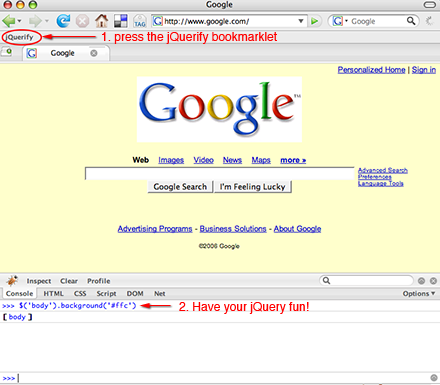
google jquerified

Please note that both the JavaScript example code and the jQuerify bookmarklet point to the jQuery source code on jquery.com. I've heard it's considered poor etiquette to freeload off of someone else's server like that, so if you plan to use the bookmarklet regularly, please point it to a copy of the source code on your own server if you have one.

Also, in the bookmarklet I added an alert message that says "Thank you for using jquery" when you activate it. I wanted that in there for myself because I like knowing for sure that it's working. Feel free to pluck that part out, though, if it annoys you.

Thanks to the folks at Left Logic for their microformats bookmarklet, which inspired me to make this one. In fact, the jQuerify bookmarklet is just a subset of theirs.

25 Responses to “jQuerify Bookmarklet”

  1. Nathan Briggs Says:

    Very nice little tool, thank you.

  2. Braden Says:

    This is great. Thank you. Really enjoying your feed.

  3. malsup Says:

    This is excellent, Karl. Thanks. I seem to always forget about bookmarklets but I think this one will get a lot of use!

  4. Clement T Says:

    Thanks for your bookmarklet. That's great.
    To ensure it is working, you may try the new friend Firebug console.log instead of alert box.

  5. Dan Atkinson Says:

    Interesting!

    I think that I might just make a little Greasemonkey script for something like this!

    Give me a little while.

    Maybe even a Firefox extension if I have time! :)

  6. Karl Says:

    Hey Dan,

    Great idea! Let us know when you get something put together.

  7. Dan Atkinson Says:

    Hey!

    I've got something put together now. It's been up onto Mozilla Addons for review and approval. Hopefully I'll have something approved within the week.

  8. Karl Says:

    Wow, that was fast! Thanks for the work, Dan. Looking forward to checking it out.

  9. J Yoo Says:

    "if you plan to use the bookmarklet regularly, please point it to a copy of the source code on your own server if you have one."

    But doesn't browser load scripts from local cache if possible? Using the bookmarklet many times will have the same impact on the jQuery server as using it only once.

  10. J Yoo Says:

    I copied your code to make a bookmarklet generator in Yubnub.
    bookmarklet2addscript - bookmarklet to add script
    It lets you add any javascript file to any webpage.

    For example, to generate a bookmarklet that will include the most recent jQuery when clicked, enter the following in Yubnub:
    bookmarklet2addscript jQuery -path http://jquery.com/src/jquery-latest.pack.js

  11. MaLi Says:

    script tags should be in head tag not body.

  12. Karl Says:

    J, thanks for that bookmarklet generator. I'm sure it'll come in handy.

    MaLi, if you want to load the script into the head, you can just change getElementsByTagName('body')[0] to getElementsByTagName('head')[0]. But I bet you already knew that.

    I prefer to put script elements in the head, too. I'm a firm believer in the separation of behavior and content. However, with this bookmarklet, we're talking about injecting a script element dynamically for temporary use. I don't really see the harm in that.

    Also, I haven't been able to find an authoritative source that says it's wrong to to put them in the body. For example, see the W3C's Scripts in HTML documents:

    The SCRIPT element places a script within a document. This element may appear any number of times in the HEAD or BODY of an HTML document."

    That's from their HTML 4 spec, but the XHTML docs don't suggest otherwise.

    I'm curious: Which references claim that script elements should not be placed in the body? And why?

  13. MrBester Says:

    "Which references claim that script elements should not be placed in the body? And why?"
    Purist ones that want all script to be in external files called in the <head> section. Whilst I am in some agreement with them, it's only if you actually know JavaScript that you can write your code in such a way that it doesn't need inline script.
    There is also the fact that organising the code makes it easier to maintain, as well as not pissing off accessibility checkers...
    I can be completely anal about it, with zero script in the tag (including onXXX events, they get added dynamically thanks to jQuery!), along with zero inline CSS, leaving me with bald semantic HTML, mainly because I strive for AAA / 508 and usability in every page. Works for me, but, as ever YMMV.

  14. Karl Says:

    MrBester, appreciate the explanation. Makes a lot of sense coming from an accessibility standpoint.

    Also, I want to reaffirm my personal "belief in the separation of behavior and content." Especially given all the recent articles about "inaccessible JavaScript frameworks," it's important to stress how ridiculously easy it is to keep scripting behavior tucked away in a separate file, safe from any accidental commingling with HTML.

    That said, I'm still curious about why injecting a script into the <body> via a bookmarklet would be considered harmful. It does nothing to the actual markup; it's temporary, immediately removed upon page refresh; and its sole purpose is for "live" testing of jQuery methods with Firebug.

  15. Remy Sharp Says:

    @Karl - injecting the JS in to the body isn't harmful.

    All W3C's documentation refers to the delivered state of the document - which should be followed as they have outlined.

    There's nothing to say how you play with that loaded DOM afterwards. Inject a script in to the head, inject in to the body - it makes no difference. If you didn't have to inject it in to the DOM (i.e. your browser supported loading external libraries) - you would, and there would be no question over whether it should be in the head.

    Finally, in the interest of reducing and redundant parts, the bookmarklet should actually just be this (since we can only debug in Firefox via Firebug):

    var s=document.createElement('script');
    s.src = "http://jquery.com/src/jquery-latest.pack.js";
    document.body.appendChild(s);

  16. BreakDance na ZonaJ Says:

    [...] É claro que tive a vantagem de não me ter de preocupar em importar o script de jQuery porque a própria página já o faz. Caso estivesse a alterar o DOM de uma página que não use jQuery, podia fazer o mesmo tipo de alterações usando o jQuerify. [...]

  17. Mattias Says:

    "Inject a script in to the head, inject in to the body - it makes no difference."

    Actually it does make a difference, you might not have a body, only a frameset. But you can always inject in the head! The first site i tried the bookmarklet on was a framed one (yes, they still exist!) and it didn't work. Luckily, firebug told what was wrong even before I started guessing.

    Having jQuery on a framed site wasn't that fun though. I seem to have forgotten everything concerning JS+frames (thank god), can you even get into the DOM of a frame from the top level?

  18. » jQuery, FireBug ed hacking dei siti » Full(o)bloG Says:

    [...] mi sono imbattuto in questo tutorial sull’utilizzo della stessa (con la bookmarklet jQueryfy) insieme a FireBug per modificare al volo i [...]

  19. druid Says:

    Better to do it like this just to be safe:

    javascript:(function(){var%20s='http://jquery.com/src/jquery-latest.js',%20t='text/javascript',q='\u0022',d=document,n=navigator,e;if(/mac/i.test(n.platform)&&/msie/i.test(n.userAgent))(d.createElement('div')).innerHTML='\u003cscript%20type='+q+t+q+'%20src='+q+s+q+'\u003e\u003c/script\u003e';else{(e=d.createElement('script')).src=s;e.type=t;d.getElementsByTagName('head')[0].appendChild(e)}})();void(0);

    =)

  20. druid Says:

    If you're using IE and need a quick JS console try this bookmarklet out:

    javascript:var Msg;window.onerror=function(msg,url,lno){Msg='[ Error: '+msg+' ]';runJS(1);return true};function runJS(num){Msg=(num==0)?'Javascript Console':Msg;if(JSval!='undefined'){JSstr=JSval};JSstr=prompt(Msg,JSstr);if(JSstr==''){runJS(0)}else if((JSstr!=null)&&(JSstr!='undefined')){setTimeout('JSval=""+eval(JSstr);runJS(0)',10)}else{JSval='';JSstr=''}}JSval='';JSstr='';runJS(0);

    Error handling, resolves values in the prompt (try typing "document.cookie"), and executes JS commands in page scope--very handy.

    =)

  21. vB-Hacker.com daki seo yarışması Says:

    thanks for share

  22. M Roeling Says:

    Has anyone tried to use this with debugbar/jscompagnion for IE? Would be nice...

  23. Otuyelu Jide Says:

    Love it, Thanks for sharing!

  24. Toca do Calango Says:

    Mais um bookmarklet para a coleção: jQuerify...

    Como desenvolvedor Web estou sempre à procura de ferramentas que me auxiliem a criar, modificar ou entender a estrutura das páginas e assim obter como resultado uma interface melhor.
    E não custa lembrar que, além de linguagens, frameworks, IDEs e t...

  25. jquery rocks Says:

    Cool!!!

Leave a Reply

XHTML: You can use these tags: <a href="" title=""> <abbr title=""> <acronym title=""> <b> <blockquote cite=""> <code> <pre> <em> <i> <li> <ol> <strike> <strong> <ul>

IMPORTANT: If you wish to post code examples, please wrap them in <code> tags. Multi-line code should be wrapped in <pre><code> </code></pre> Also, use &lt; instead of < and &gt; instead of > in the examples themselves. Otherwise, you could lose part of the comment when it's submitted.
